
Description
This article is a quick run through of the various parts of the HELIOS® signal chain and how to account for the capacity.
How to calculate bandwidth
Use this example: a 320 × 320-pixel tile with a 50 Hz, 12-bit, single-stream input. Reference the HELIOS® User Guide Output Port Capacity table (screenshot below).
Panel Pixel Count: 320 x 320 pixels (102,400 total pixels)
Panel Ethernet Speed: 1G
Panel Max Streams: 2
Pixels per switch port: 485,000 (using the 12-bit / 1 Gb/s column and the 50 Hz row)
Pixels per switch: 485,000 (1 Gb/s link) × 10 (fiber link is 10 Gb/s) = 4,850,000
Pixels per HELIOS®: 4.858 million (10G switch total) × 8 (number of fiber outputs) = 38,864,000
Pay attention to the NOTE at the bottom of the screenshot below. HELIOS can process up to 35 million pixels.
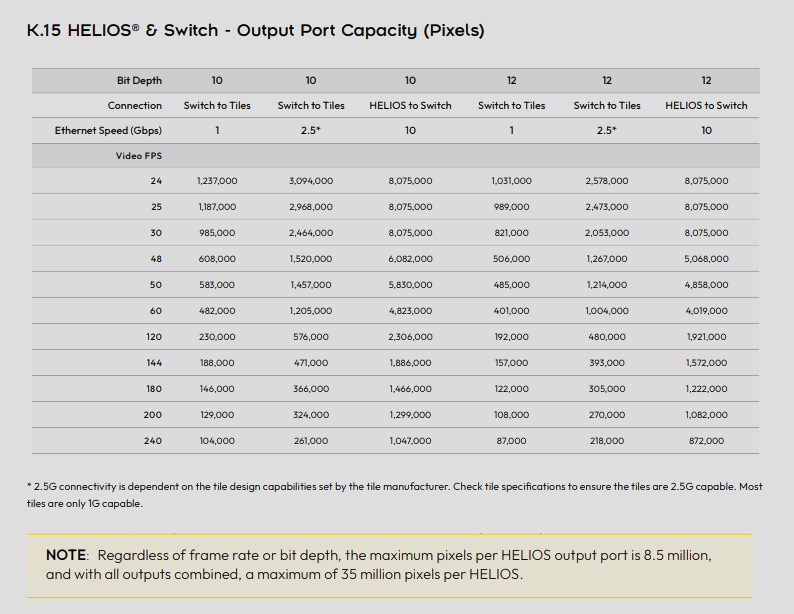
Using the above data, we need to make sure that we don't exceed capacity at each of those steps. So the total panels you can do at each stage are as follows:
Switch port: 485,000 ÷ 102,400 pixels per panel = 4.74 → 4 panels per port
Total per switch: 4.858 million ÷ 102,400 pixels per panel = 47.44 → 47 panels
Total per HELIOS®: 35 million ÷ 102,400 pixels per panel = 341.79 → 341 panels
GhostFrame/GhostFrame Pro Multisource
Remembering that the above are the capacities for a single stream, now we need to account for multiple. The fastest way of doing that is to take that Panel Pixel Count # (102,400 pixels) and multiply it by the number of streams. For example, 2 streams would be 204,800 pixels per panel. Once you have that number, redo the math above using the new pixel count.
Low Latency
There are 2 options for using Low Latency (Tile and Processor). System designs must account separately for Tile Low Latency and Processor Low Latency.
Tile Low Latency - There are no capacity/mapping implications when using Tile Low Latency. All tiles "should" be capable of doing it which assumes they are tuned correctly.
Processor Low Latency - This latency feature requires a good bit of consideration when requested. The basic rules are that the wall needs to be wired in vertical columns and stacked ports likely need to be interleaved (the key rules can be found in the HELIOS User Guide). It is highly recommended that you reach out to support@megapixelvr.com and let us help validate your Low Latency build.