
Description
Megapixel built HELIOS® to make day two operations easy for operators. When pixels fail, such as being stuck on or off due to degradation or physical damage, HELIOS® has the ability to automatically hide the faults to keep the screen looking its best without the need to replace physical LED tiles. Certain tiles, such as Ventana, are engineered to identify and adjust for faulty pixels – providing a self-healing feature for the display. HELIOS® now automates this detection and correction through a feature called Pixel fault compensation."
Note: Not all tiles support this feature. Please consult the tile manufacturer to verify. Getting Started
There are two methods in the HELIOS® UI to activate the Pixel fault compensation feature:
Automatically during startup (available in HELIOS® v26.04.0 or later)
Manually via Bad pixel detection
Automation
The Settings menu within the HELIOS® UI allows the user to choose whether or not the system should run the detection on startup :
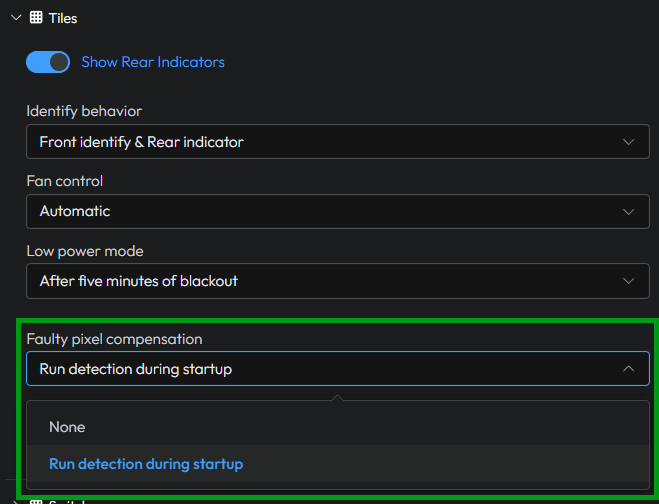
The menu above can be found in Settings -> Tiles
By selecting None the system will not automate the fault detection process.
By selecting Run detection during startup the fault detection process will run when a tile connects to HELIOS®.
Note: Pixel compensation re-runs only when a tile reconnects to HELIOS® after a reboot or power cycle, not on intermittent dropouts or cable reconnections.Manual trigger
An alternate option is a manual trigger located in the Health -> Reports -> “Pixel error detection” report. Find the column labeled as “Bad pixel removal” This shows a list of all panels connected to the system, and whether the faulty/bad pixel compensation is supported for the tiles in the display.
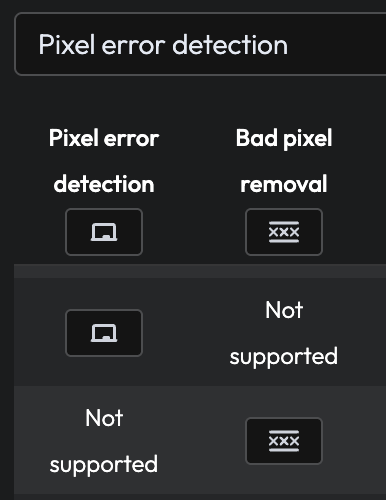
The report above can be found in Health -> Reports
Clicking the remove button starts the process immediately. The process itself is very fast and usually completes in less than 1 second.
Considerations
There are important considerations when using this feature.
Visual artifacts: When this feature is actively running, there can be visual artifacts on the screen. The UI displays a warning so operators are aware that visual artifacts may appear on screen during the process..

Unsupported tiles: Not all tiles support the fault detection feature. Contact your panel manufacturer to find out if they support automatic fault correction. The HELIOS® UI will also make the user aware of whether the tiles support the feature or not.
